
Understanding ReplyRush Pricing Plans & DM Limit Reset
Many users get confused about how DM limits and billing dates work. This guide explains everything step-by-step with simple examples and a chart for easy understanding.
Overview
When you subscribe to a ReplyRush plan (like Boost, Pro, or Max), you get access to:
- Advanced DM automation features (Comment to DM, Follow-Gated DMs, Flow Automation, etc.)
- A monthly DM limit (like 40K DMs for the Boost plan)
- Access validity for your chosen billing cycle (monthly or yearly)
However, there are two important things to understand:
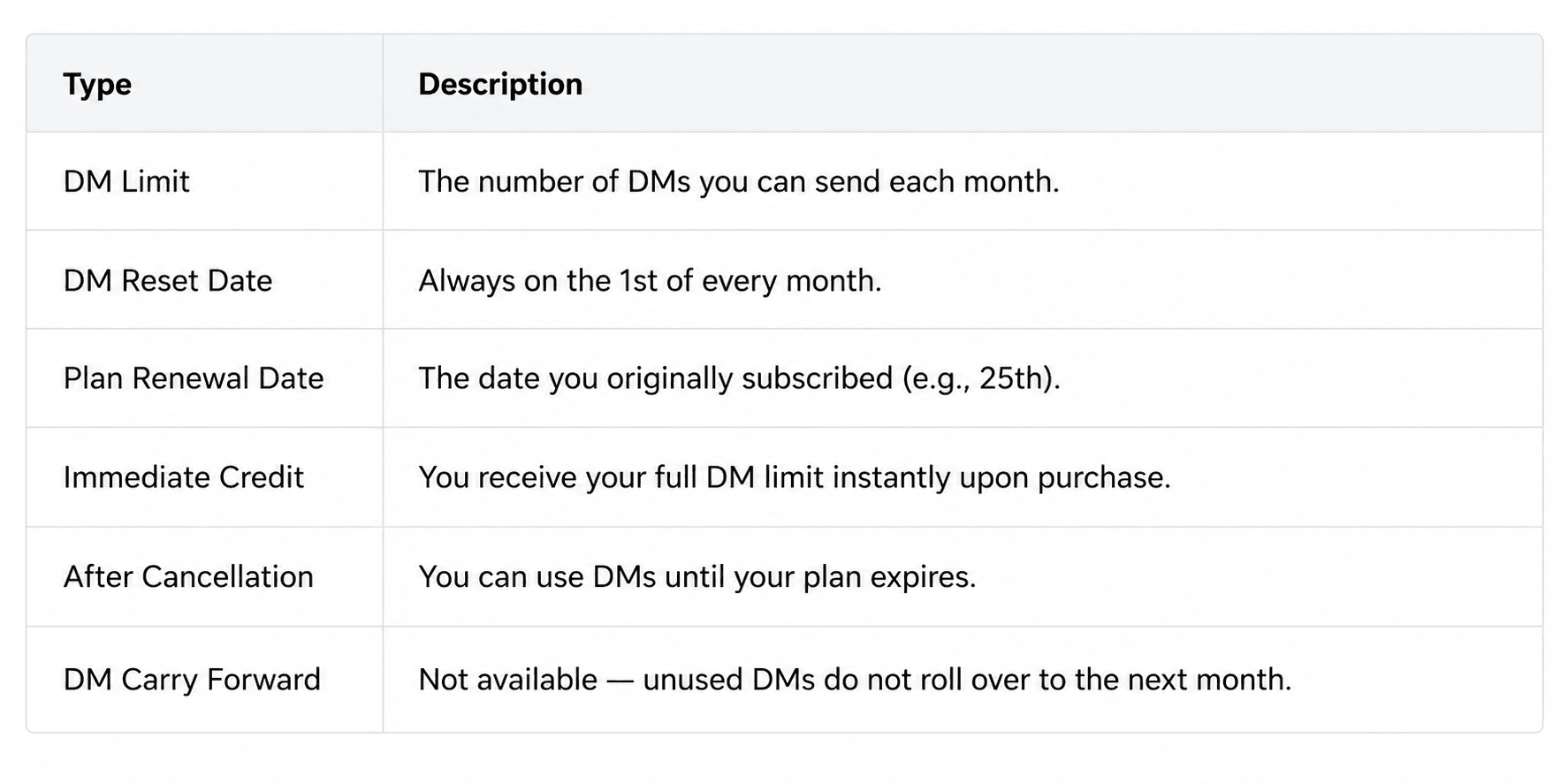
- Your DM limit resets on the 1st of every month, not on your plan purchase date.
- Your plan renewal date stays fixed based on when you purchased the plan.
Let’s go through this in detail.
Example: How DM Limit and Renewal Work
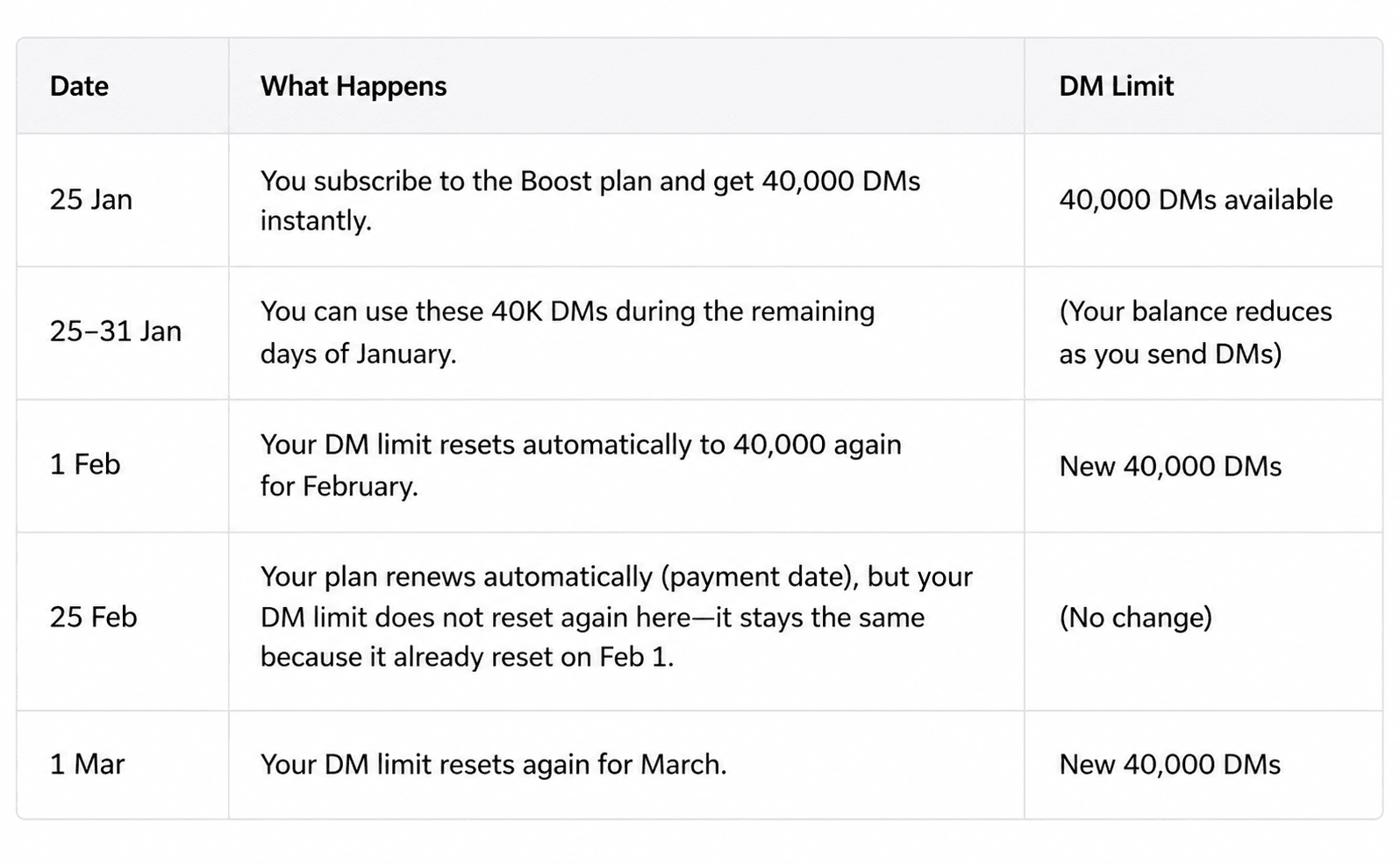
Suppose you purchase the Boost Plan (40,000 DMs/month) on 25th January.
In Simple Words
- You get your DM limit immediately when you first subscribe.
- Then, your DM limit resets automatically on the 1st of every month (not your renewal date).
- Your billing/renewal date (like 25th of each month) only affects payment and plan validity, not your DM count.
What Happens If You Cancel Your Plan
If you cancel your subscription:
- You’ll still have access to your plan features until your billing cycle ends (for example, till 25th Feb).
- You can continue using your remaining DMs during that time.
- Once your plan expires, all premium features and DM sending ability are paused.
You can re-activate anytime by purchasing a plan again.
Visual Timeline Example
Here’s a quick visual timeline for easier understanding:
January 2025
- 25 Jan: Plan purchased → 40K DMs added
- 26–31 Jan: Use those DMs
- 1 Feb: Auto reset → new 40K DMs
- 25 Feb: Plan renews (no DM change)
- 1 Mar: Auto reset → new 40K DMs
Summary Table
Example Scenarios
Scenario 1 — New Subscription Mid-Month
- You buy Boost on 20th June → You get 40K DMs.
- On 1st July, your DM limit resets to 40K again.
- On 20th July, your plan renews (billing), but DMs remain unchanged until 1st August.
Scenario 2 — Renewal but No DM Change
- Your renewal date (e.g., 25th) only charges you again.
- DM limit is refreshed only on the 1st, not on the renewal date.
Scenario 3 — Cancelled Plan
- You cancel on 15th July.
- You can keep using DMs until 25th July (your plan expiry date).
- After that, DM automation stops until you resubscribe.
Key Takeaways
- DM limit refreshes on the 1st of each month
- Plan renewal and DM reset are separate
- You can always use your remaining DMs until plan expiry
- Unused DMs don’t roll over to the next month
- DM count is linked to monthly usage, not billing date
FAQ
Q: Why didn’t my DM limit renew on my billing date?
A: Because DM limits refresh on the 1st of each month, not when you pay. Your billing date only controls payment and plan validity.
Q: If I buy a plan on the 28th, do I lose days?
A: No. You get full DMs instantly and another full reset on the 1st. That means you get a few extra DMs in your first few days.
Q: What if I cancel right after buying?
A: You can still use your DMs until your plan expires. After that, automation stops.